How to Delete
How to Delete an Image (iteam)
If you want to delete an Image (iteam), you can use the API of Snack Prompt.
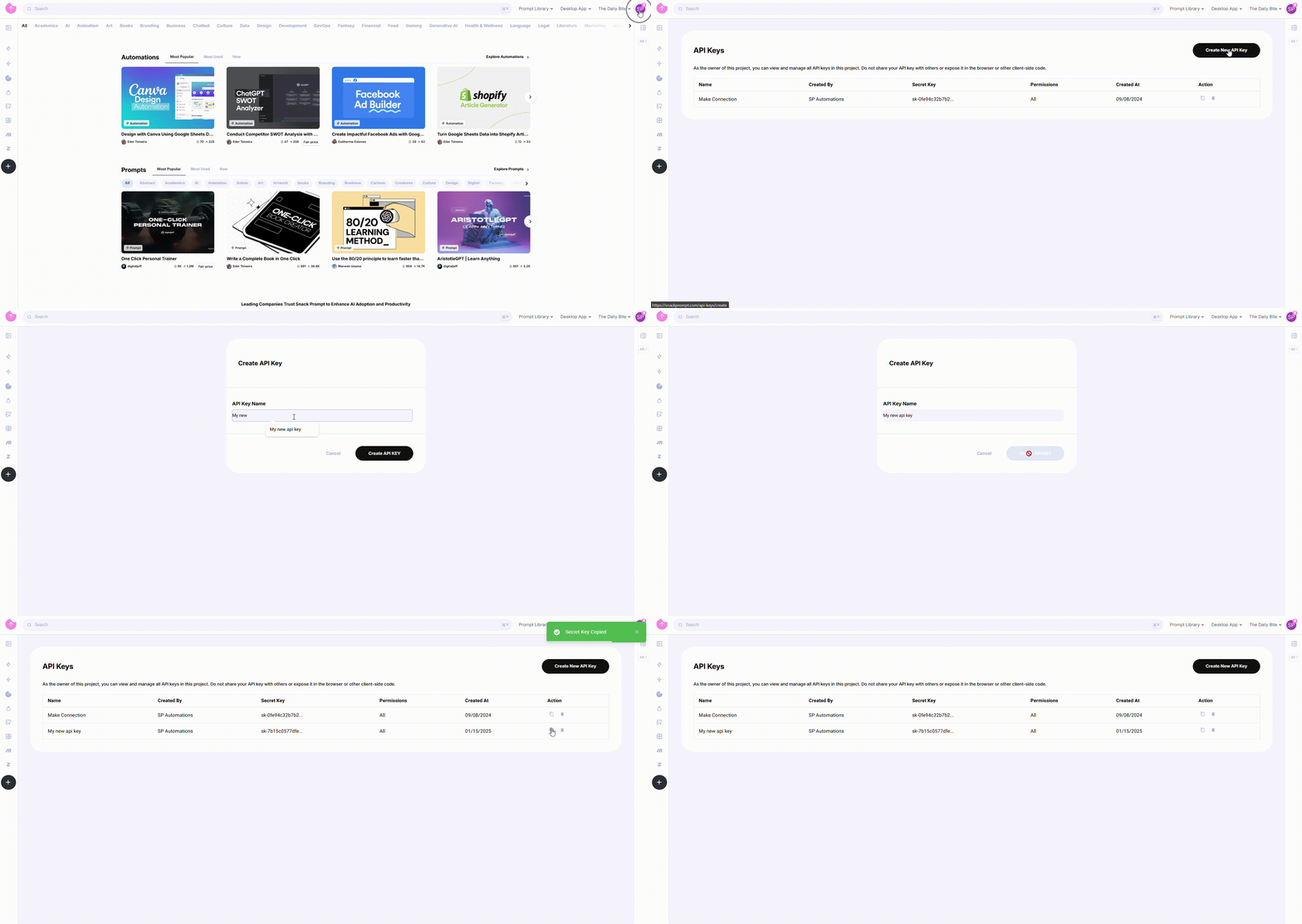
How to Generate an API Key
To generate an API Key, follow these steps:
- Log in to your Snack Prompt account.
- Navigate to the API Keys page: https://snackprompt.com/api-keys.
- Click the Create New API Key button.
- Provide a name for your Key to easily identify it later.
- Once created, you can:
- Copy the Key for immediate use.
- Delete the Key when it's no longer needed.
Note: API Keys do not have an expiration date and will remain valid until deleted.
Deleting an Image (iteam)
To delete an Image (iteam) using the Snack Prompt API, make a DELETE request to the following endpoint:
Endpoint
DELETE /v1/elemental/{id}
Params
id: The ID of the Image (iteam) you want to delete.
Headers
x-api-key: Your API Key.
Example Request
DELETE /v1/elemental/:id
x-api-key: YOUR_API_KEY
Example Response
 {
    "code": 201,
    "meta": {
        "version": "v1.0.0",
        "is_authenticaded": true
    }
}
Code Examples
You can also use the Snack Prompt API in different programming languages:
- JavaScript
- Python
- Go
const response = await fetch(
  "https://api-integrations.snackprompt.com/v1/elemental/{id}",
  {
    method: "DELETE",
    headers: {
      "x-api-key": "YOUR_API_KEY",
    },
  }
);

if (response.ok) {
  console.log("Image (iteam) deleted successfully");
} else {
  console.error("Failed to delete Image (iteam)");
}
import requests

url = 'https://api-integrations.snackprompt.com/v1/elemental/{id}'
headers = {
    'x-api-key': 'YOUR_API_KEY'
}

response = requests.delete(url, headers=headers)

if response.status_code == 201:
    print('Image (iteam) deleted successfully')
else:
    print('Failed to delete Image (iteam):', response.text)
package main

import (
  "fmt"
  "net/http"
)

func main() {
  url := "https://api-integrations.snackprompt.com/v1/elemental/{id}"
  req, err := http.NewRequest("DELETE", url, nil)
  if err != nil {
    fmt.Println("Error creating request:", err)
    return
  }

  req.Header.Set("x-api-key", "YOUR_API_KEY")

  client := &http.Client{}
  resp, err := client.Do(req)
  if err != nil {
    fmt.Println("Error sending request:", err)
    return
  }
  defer resp.Body.Close()

  if resp.StatusCode == http.StatusOK {
    fmt.Println("Image (iteam) deleted successfully")
  } else {
    fmt.Printf("Failed to delete Image (iteam): %s\n", resp.Status)
  }
By using this API, you can programmatically delete an Image (iteam).
For a complete information about the params and response, please refer to the Elementals section.